AI Is Not Just for Answering Questions, but for Helping Enterprises Get Work Done
AI Assistant provides enterprises with a Human First AI assistant platform that helps teams handle daily work, cross-department workflows, data analysis, and professional communication, making AI a real part of business operations.
Through the Human First AI design philosophy, AI Assistant is not just a chat tool, but an enterprise intelligent assistant that can help businesses execute work, organize information, analyze data, optimize workflows, and improve decision-making efficiency.
AI Assistant helps enterprises consolidate complex, repetitive, and cross-system daily work into one unified AI platform, allowing departments and employees to complete tasks faster through AI while maintaining security, control, and auditability.
Omnisenti AI
What Can AI Assistant Do?
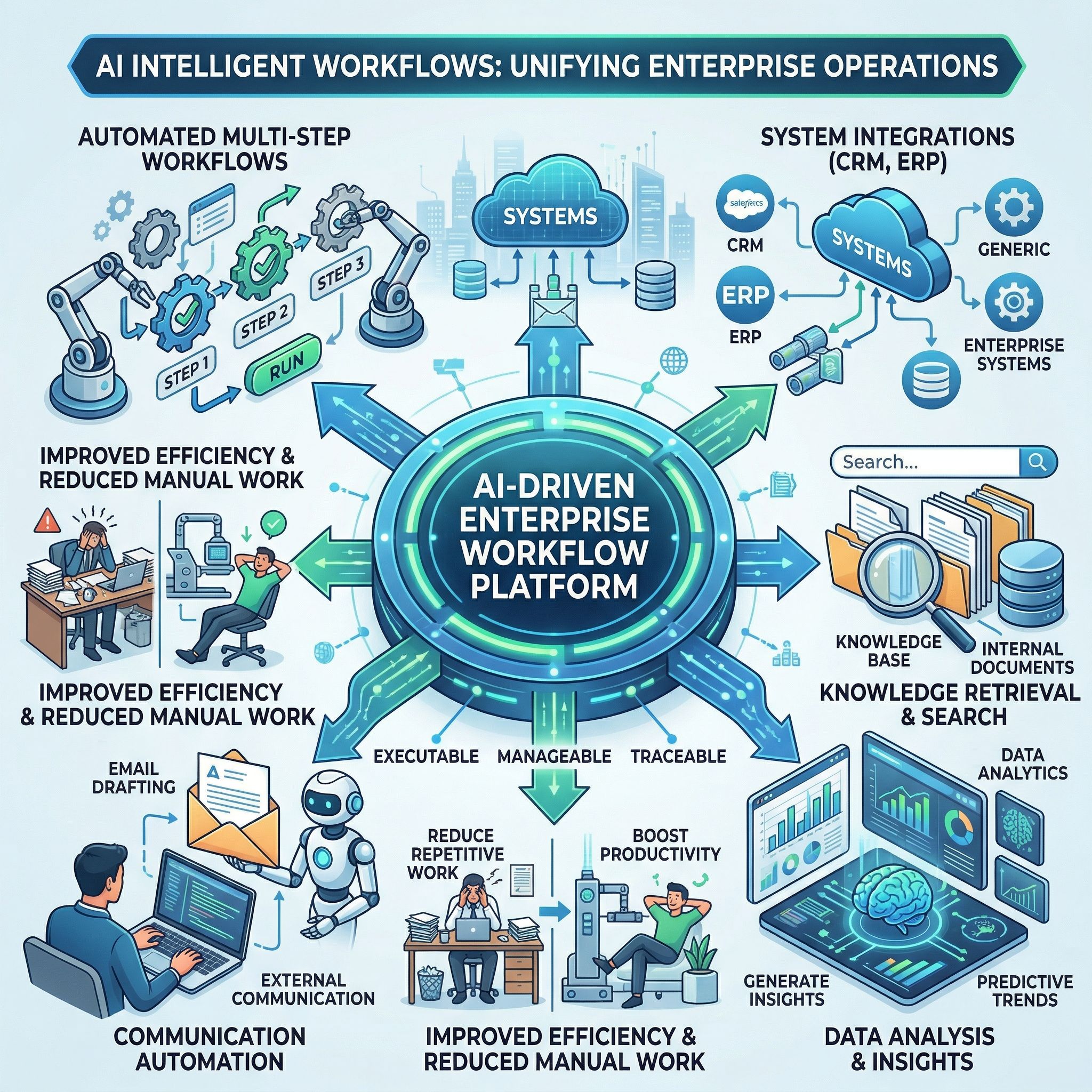
Through AI intelligent workflows, enterprises can integrate daily tasks, cross-department processes, knowledge retrieval, data analysis, and professional communication into a work platform that is executable, manageable, and traceable.
- Automatically execute multi-step workflows
- Integrate CRM, ERP, and other enterprise systems
- Search enterprise knowledge and internal documents
- Quickly analyze complex data and generate insights
- Automatically draft professional emails and external communication content
- Reduce repetitive manual work and improve overall efficiency
How AI Assistant Works
1. Receive Tasks or Queries
Employees can issue tasks or requests to AI Assistant through text commands, forms, work events, or system data changes.
2. Understand Work Intent
The system determines whether the request is for knowledge lookup, workflow execution, automatic report generation, data analysis, or email drafting.
3. Retrieve Data and Knowledge
If knowledge content is required, RagTag extracts the most relevant information from Sheshata and other data sources, allowing AI Assistant responses to be more evidence-based.
4. Apply Permission and Governance Rules
GateKippa checks the user’s identity, role, and authorization scope to ensure AI Assistant accesses data and performs tasks only within the permitted boundaries.
5. Execute Work or Generate Results
For workflow tasks, Beeline and Fuse coordinate execution; for data analysis, Mentara provides insights; for email communication, Email Pro generates suggested content.
6. Sync Back to Systems and Continuously Optimize
All results, records, summaries, or data outputs can be synchronized back to CRM, ERP, or other enterprise systems for follow-up and continuous optimization.
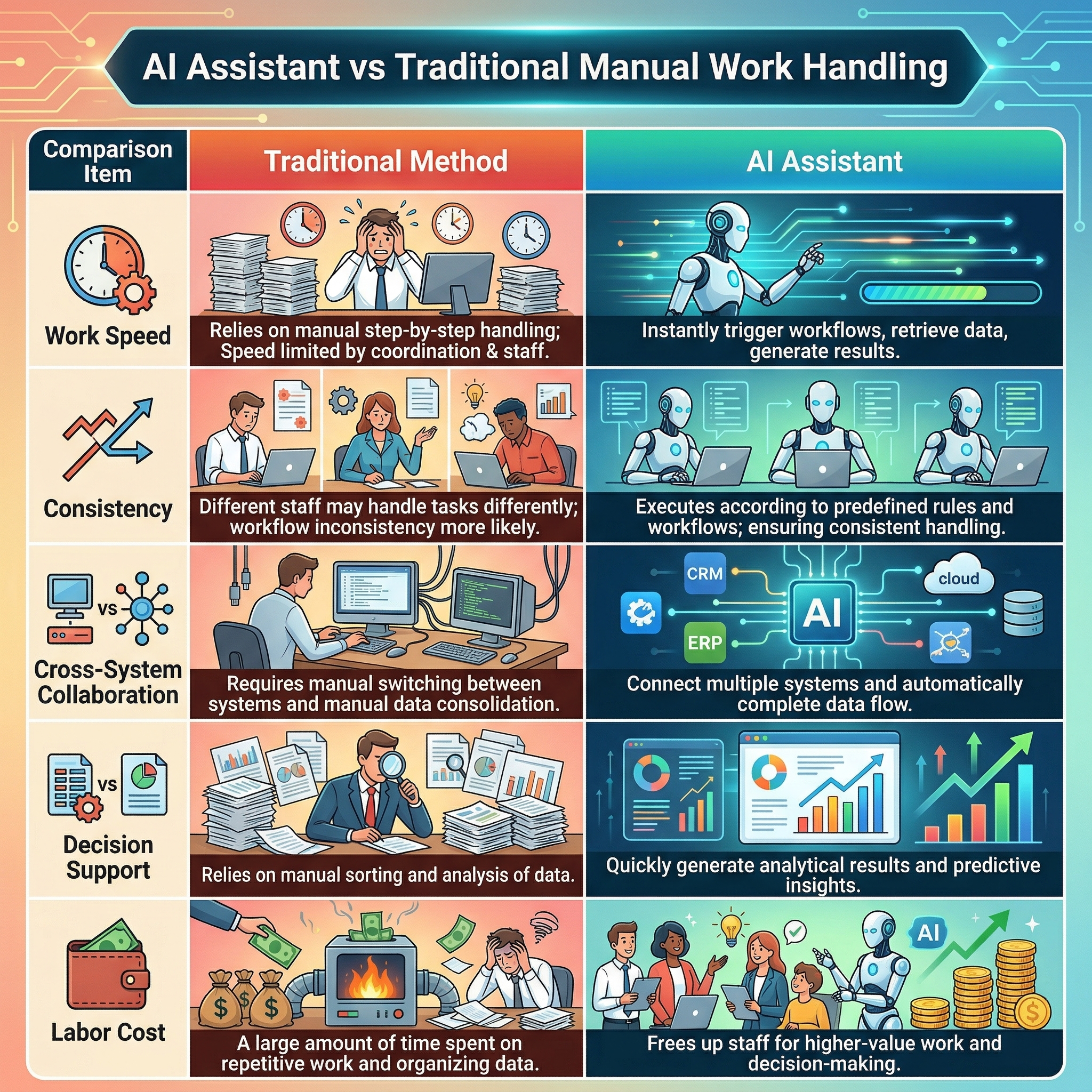
AI Assistant vs Traditional Manual Work Handling
Comparison Item
Traditional Method
AI Assistant
Work Speed
Relies on manual step-by-step handling, with speed limited by department coordination and staff arrangement.
Can instantly trigger workflows, retrieve data, and generate results.
Consistency
Different staff may handle tasks differently, making workflow inconsistency more likely.
Executes according to predefined rules and workflows, ensuring consistent handling.
Cross-System Collaboration
Requires manual switching between systems and manual data consolidation.
Can connect multiple systems and automatically complete data flow.
Decision Support
Relies on manual sorting and analysis of data.
Can quickly generate analytical results and predictive insights.
Labor Cost
A large amount of time is spent on repetitive work and organizing data.
Frees up staff for higher-value work and decision-making.
Core AI Architecture and Component Modules
AI Assistant is composed of multiple core technologies from Omnisenti AI, ensuring that AI Assistant combines execution capability, analytical capability, knowledge capability, and governance capability:
GateKippa | AI Access and Permission Management
GateKippa is responsible for managing access rights to the AI system, ensuring AI only accesses data and executes tasks within authorized boundaries. It supports role-based permission management, AI model usage restrictions, audit logs, single sign-on (SSO), and automated account management.
Beeline | AI Workflow Automation
Beeline is responsible for turning repetitive work and cross-department workflows into executable AI intelligent workflows, helping enterprises automate SOPs and daily tasks. It supports multi-step task execution, cross-system integration, workflow templates, event triggers, and audit records.
Fuse | AI Platform and System Coordination Core
Fuse coordinates interactions between the AI system and enterprise applications. It can integrate internal systems and approved external data sources, and manage AI intelligent workflows, data synchronization, and multi-module collaboration.
Sheshata | Enterprise AI Knowledge Base Management
Sheshata allows enterprises to manage AI knowledge content independently, including document upload, knowledge updates, version tracking, and access control, ensuring AI responses and work support are based on the latest and most accurate enterprise information.
RagTag | RAG Knowledge Retrieval and Answer Enhancement
Through Retrieval-Augmented Generation (RAG) technology, RagTag allows AI to reference enterprise data sources when answering questions, conducting analysis, or processing documents, improving accuracy and reducing hallucination issues.
Mentara | AI Data Analysis and Intelligent Insights
Mentara transforms complex data into actionable insights, supporting multi-source data integration, AI-driven advanced analysis, custom KPI dashboards, predictive models, and report sharing, helping management make data-driven decisions faster.
Mail ProV | AI Intelligent Email Assistant
Mail ProV helps enterprises speed up professional email handling. Through AI drafting, tone adjustment, and contextual understanding, it improves internal and external communication efficiency, especially for customer service, sales, and teams with high email volumes.
Integration Capabilities: CRM / ERP / Email / Knowledge / Data
CRM Customer Relationship Management Integration
AI Assistant can connect with CRM systems to help search customer information, record interactions, synchronize work records, and support follow-up actions.
ERP Enterprise Management System Integration
For enterprises that need to handle procurement, processes, inventory, orders, finance, or internal operations, AI Assistant can help integrate ERP workflows through Fuse and Beeline.
Email Intelligent Email Integration
Through Mail ProV, AI Assistant can draft replies, adjust tone, analyze email context, and synchronize communication records.
Knowledge Base Integration
AI Assistant can access enterprise knowledge, documents, and internal workflow content through Sheshata and RagTag.
Data Analytics Integration
Through Mentara, AI Assistant can embed data analysis capabilities into daily work, allowing users to directly obtain KPIs, trends, and predictive insights.
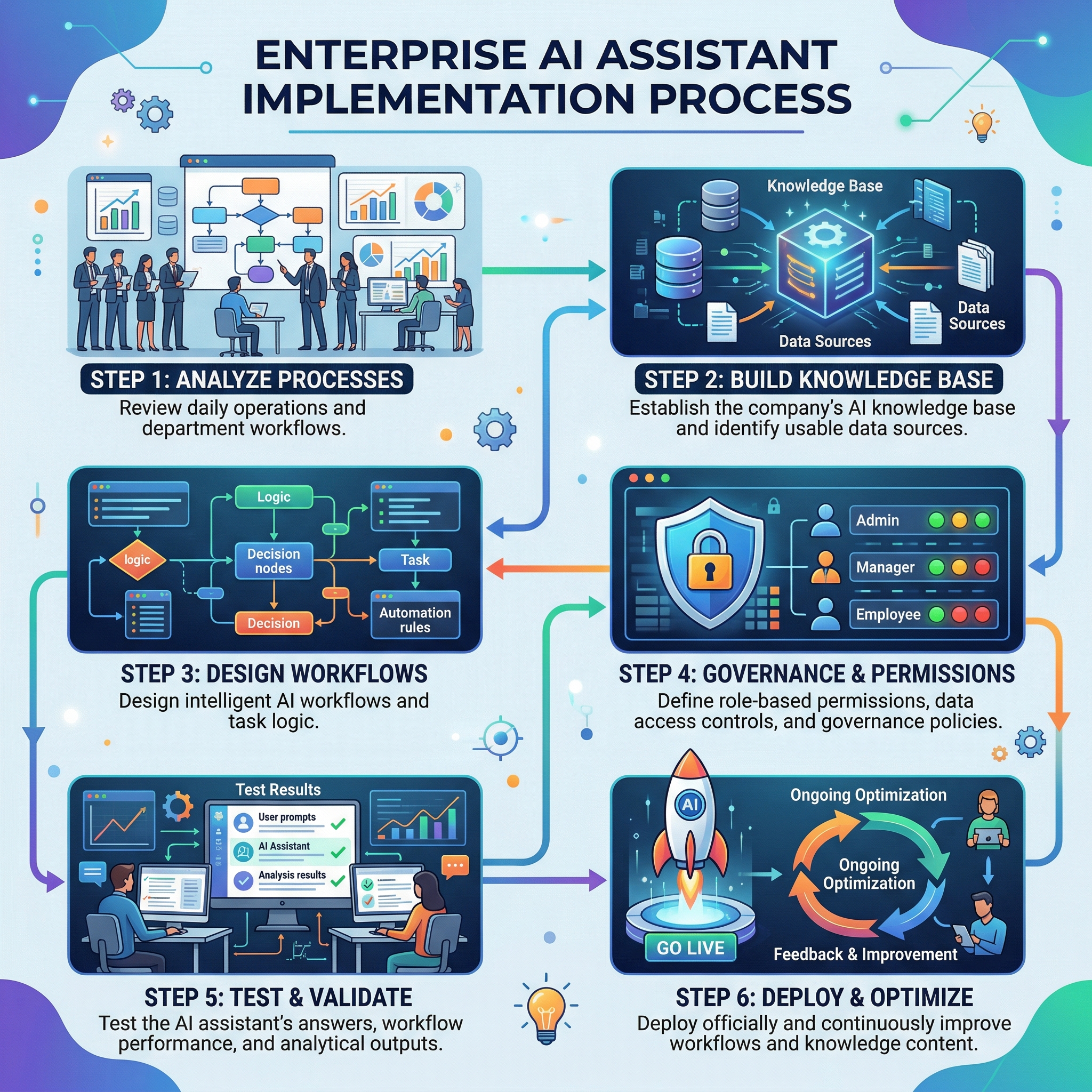
AI Assistant Implementation Process
Key Business Value
- Improve Work Efficiency: Automatically handle complex and repetitive tasks, reducing manual workload.
- Reduce Workflow Errors: Ensure workflows are executed consistently according to predefined rules.
- Accelerate Response and Execution Speed: Whether for tasks, analysis, or communication, work gets completed faster.
- Improve Decision Quality: Support management through data analysis and predictive insights.
- Strengthen Enterprise Knowledge Utilization: Turn documents and knowledge into truly usable working resources.
- Maintain Security and Governance: Use AI under permissions, auditability, and data boundary controls.
Applicable Scenarios
Finance and Administrative Workflows
Can be used for invoice processing, approval workflows, internal requests, and report preparation.
Human Resources and Onboarding Workflows
Can assist with new employee onboarding, internal Q&A, workflow notifications, and form handling.
Sales and Customer Follow-up
Can support customer inquiry organization, email drafting, CRM updates, and follow-up reminders.
Management Data Analysis
Can be used for KPI tracking, operations analysis, forecasting, and management decision support.
Cross-Department Daily Work Collaboration
Can integrate knowledge, systems, and workflows so employees can complete daily tasks faster.
Frequently Asked Questions
AI Assistant is an AI system that can help enterprises handle daily work, knowledge lookup, workflow execution, data analysis, and professional communication.
A normal chatbot mainly handles Q&A and conversation; in addition to answering questions, AI Assistant can also help execute workflows, analyze data, draft emails, and integrate enterprise systems.
Yes. AI Assistant can integrate with CRM, ERP, knowledge bases, Email, and other enterprise systems.
Yes. Through RagTag’s knowledge retrieval capabilities and Sheshata’s knowledge base management, AI Chatbot can provide answers that are more closely aligned with actual business operations based on enterprise documents, FAQs, and data sources.
AI Chatbot can use GateKippa to set role permissions, access controls, audit records, and AI model usage restrictions, ensuring data is used only within authorized boundaries.
No. The system can use GateKippa to set permission management, access control, audit logs, and data governance rules to ensure AI operates within authorized boundaries.
It is suitable for enterprises that need to handle a large volume of repetitive work, cross-department workflows, internal knowledge applications, data analysis, or high-frequency email communication.
Not necessarily. Enterprises can start with lower-barrier workflows or knowledge applications and gradually implement AI Assistant.
AI Assistant can help enterprises handle multi-step workflows, knowledge queries, document organization, data analysis, report generation, email drafting, and cross-department collaboration. It is especially suitable for daily work that is highly repetitive, clearly structured, and requires cross-system operations.
No. AI Assistant is also suitable for SMEs and growing businesses. Enterprises can start with a single department or a single workflow, such as administration, HR, sales follow-up, report processing, or knowledge search, and then gradually expand to more work scenarios.
Yes. Through enterprise knowledge base management and RAG knowledge retrieval technology, AI Assistant can provide answers and support that are more aligned with the enterprise’s actual situation based on internal company documents, policies, process descriptions, FAQs, and designated data sources.
Yes. AI Assistant does not just answer questions. It can also work with AI workflow automation capabilities to automatically execute multi-step tasks, such as data organization, workflow notifications, task assignment, approval preparation, report output, and cross-system data updates.
Yes. AI Assistant can connect the workflows and data sources of different departments, helping enterprises integrate administration, human resources, finance, operations, sales, and management decision support into one unified AI platform.
Yes. Through the AI data analysis module, AI Assistant can support KPI tracking, operational analysis, trend identification, predictive analysis, and report output, helping management gain a faster understanding of business conditions and decision directions.
Yes. AI Assistant can help draft email content, adjust tone, understand previous conversation context, and support multilingual communication. It is especially suitable for customer service, sales, management, and teams that need to handle high volumes of email.
Usually not. AI Assistant can be introduced starting from the most common and repetitive tasks, while aligning gradually with the enterprise’s existing workflows, so the learning barrier is relatively low and employees can usually understand and apply it in a short time.
The main role of AI Assistant is to help enterprises reduce repetitive work, improve processing efficiency, and support decision-making, rather than simply replace employees. Enterprises can reallocate staff to higher-value work such as customer relationships, strategic planning, management, and innovation.
Yes. Enterprises can set different permissions based on department, role, seniority, and data authorization scope, ensuring different users can only view or execute the data and workflows related to their own work.
It depends on the complexity of the enterprise workflows and the scope of integration. Generally, businesses can first start with a single scenario or department, quickly establish an initial use case, and then gradually expand to other workflows and systems.
It is generally recommended to start with departments where processes are clearer and repetitive work is more common, such as administration, human resources, finance, customer service, sales support, or management reporting, where results are easier to see within a short time.